Fix Chinese characters showing as boxes (tofu) in Markdown to PDF
Quick answer
Boxes (□, often called "tofu") mean the font used for the PDF has no Chinese glyphs. Garbled text like "大家" means the file was read with the wrong encoding. The quickest fix: paste your Markdown into MarkPDF, pick the Noto Sans Simplified Chinese font and download the PDF.
Boxes and garbled text are different problems
- Boxes / tofu: the text is fine, but the font has no glyph for the character, so a placeholder box is drawn. Typical for converters that only embed Western fonts, or Linux servers without CJK fonts installed.
- Garbled text (mojibake): a UTF-8 file was decoded as Latin-1, GBK or another encoding. Changing the font does not help.
Blank characters: reproduced in Pandoc
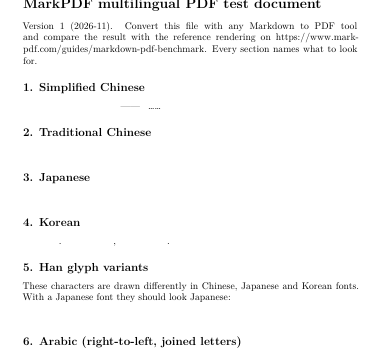
Some tools show boxes for missing glyphs; LaTeX engines leave the space empty and only print a “Missing character” warning in the log. Both have the same cause: no font with those glyphs was selected.
Try it with a Chinese sample document
Open a Chinese sampleFix per tool
| Tool | Fix | Tested |
|---|---|---|
| Pandoc (pdflatex) | Switch to xelatex: --pdf-engine=xelatex -V CJKmainfont="…". See the Pandoc error page | Yes |
| Pandoc (xelatex / lualatex) | Add -V CJKmainfont="<font with your language>"; Korean needs a font with Hangul | Yes |
| md-to-pdf, VS Code Markdown PDF (Chromium) | Install CJK fonts on the machine (Debian/Ubuntu: fonts-noto-cjk), or set font-family in a custom stylesheet | md-to-pdf rendered correctly on Windows with system fonts; the Linux fix is the documented approach, not tested here |
| Obsidian (built-in export) | Force a CJK font with a CSS snippet (reported on the Obsidian forum) | Not tested |
| Typora | Add a CJK font to font-family in the theme CSS | Not tested |
Export Chinese Markdown to PDF with MarkPDF
- Open the converter and paste your Markdown, or drop a
.mdfile onto the editor. - Open ⚙ Settings and choose Noto Sans Simplified Chinese (or Traditional Chinese for Taiwan/Hong Kong text).
- Check the live preview, then click Download PDF.
Everything happens in your browser and the file is not uploaded. .md files are read as UTF-8, which also avoids encoding problems.
Troubleshooting other tools
- Save the
.mdfile as UTF-8 (VS Code shows and changes the encoding in the status bar). - Set a CJK-capable
font-familyin the tool's theme or stylesheet, e.g."Noto Sans SC", "Microsoft YaHei", "PingFang SC". - On Linux, install CJK fonts first, e.g. the
fonts-noto-cjkpackage on Debian/Ubuntu. - Pandoc's default pdflatex engine cannot typeset Chinese; use xelatex with a CJK font. See Typora, Pandoc and VS Code CJK font issues.
Frequently asked questions
Why does the text look fine in my editor but turn into boxes in the PDF?
Editors and browsers fall back to system fonts for missing glyphs. Many PDF tools embed a fixed Western font instead. MarkPDF uses the same fonts for the preview and the PDF, so what you see is what you get.
Does the same happen with Japanese and Korean?
Yes, for the same reason. Pick Noto Sans Japanese or Noto Sans Korean in MarkPDF.
Can I select and copy text in the PDF?
Yes, with Download PDF (text), which uses your browser’s print engine. Quick download (image) saves pages as images, so text is not selectable there.
Do I need to install fonts or create an account?
No. Fonts load on demand from Google Fonts, and system CJK fonts are used if the network is unavailable.