Japanese kanji look Chinese in my PDF: fixing Han glyph variants
Quick answer
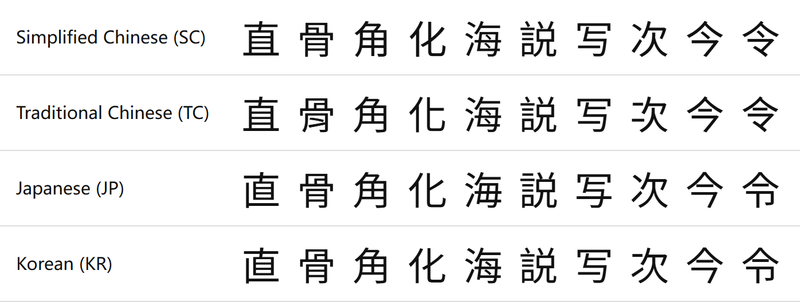
Chinese, Japanese and Korean share Unicode code points for most Han characters, but each region draws some of them differently. A PDF tool that picks a Chinese font for Japanese text (or the reverse) shows the wrong forms. Fix it by choosing a font for the document’s language, or by marking passages with lang="ja" / lang="ko" so the tool can switch fonts.
Symptom
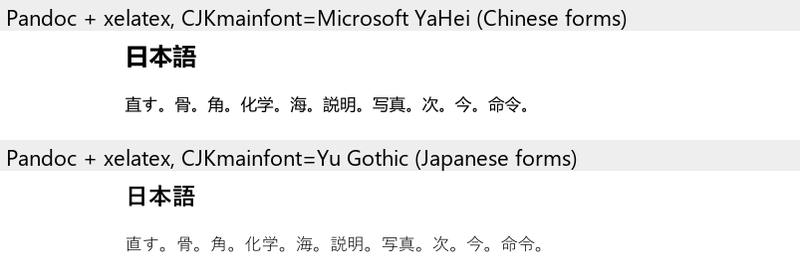
CJKmainfont="Microsoft YaHei" (Chinese forms) vs "Yu Gothic" (Japanese forms).Cause
Unicode “unified” these characters, so the character code does not say which regional form to draw; the font decides. When a document has no language information, tools fall back to whatever CJK font comes first: often a Chinese font on Chinese systems, or the font set for the whole document.
Open a Japanese sample with the Japanese font
Open the Japanese sampleFixes in the original tool
- Pandoc + xelatex: set the font for the document’s language, e.g.
-V CJKmainfont="Yu Gothic"(Windows),"Hiragino Sans"(macOS) or"Noto Sans CJK JP"for Japanese. Tested: switching from Microsoft YaHei to Yu Gothic changed the forms as shown above. - HTML/Chromium-based tools (tested with md-to-pdf; VS Code Markdown PDF and Typora also render with Chromium/Electron but were not tested): mark the language. With
<span lang="ja">…</span>or<html lang="ja">, Chromium picks a Japanese fallback font; md-to-pdf rendered ourlang="ja"line in Japanese forms. Or setfont-familywith the regional font first. - Mixed documents: put each language in its own
langspan (or, in LaTeX, use separate font families per language).
日本語の段落:<span lang="ja">直 骨 角 化</span>
中文段落:<span lang="zh-CN">直 骨 角 化</span>
In MarkPDF
Choose the font for your document’s language in ⚙ Settings (Japanese, Korean, Simplified or Traditional Chinese). Passages marked with lang="ja", lang="ko", lang="zh-TW" or lang="zh-CN" switch to that region’s Noto font automatically, in the preview and in both PDF types.
Frequently asked questions
Is this a bug in Unicode?
No. Han unification is by design; the language tag and the font select the regional form.
Which characters differ?
Many, usually in small strokes: 直, 骨, 角, 化, 海, 令, 次, 写, 今 are easy to spot. Readers notice the wrong forms even when each one looks minor.
Can one font show all regional forms?
Pan-CJK fonts such as Noto Sans CJK / Source Han Sans contain all forms, but they still need the language tag (or the regional font name) to pick the right one.