Markdown to PDF in 15 scripts: a reproducible tool comparison
Quick answer
With default settings, Pandoc’s LaTeX engines either stop with an error (pdflatex) or silently drop every non-Latin character (xelatex, lualatex). Chromium-based tools (md-to-pdf, MarkPDF) rendered all 15 scripts on a machine with the needed fonts. Download the test file and run the same commands to check your own setup.
Test file and method
Test file: markpdf-multilingual-test.md (Simplified/Traditional Chinese, Japanese, Korean, Han glyph variants, Arabic, Persian, Urdu, Hindi, Bengali, Thai, Tamil, Vietnamese, Cyrillic/Greek/extended Latin, code, a table, a link and several pages of text).
- Machine: Windows 11, default system fonts (includes Microsoft YaHei, Yu Gothic, Malgun Gothic, Nirmala UI, Leelawadee UI). Tested on 2026-11-06.
- Glyphs: page images rendered with
pdftoppmand checked by eye. - Text extraction:
pdftotext -enc UTF-8and a search for one phrase per script plus the last line of the file. - Pages and size:
pdfinfoand the file size. Default settings unless the row says otherwise.
Results
| Tool and version | Command | Result | Text extractable | Pages / size |
|---|---|---|---|---|
| Pandoc 3.5 + pdflatex (MiKTeX 25.12) | pandoc test.md -o out.pdf | Stops: Unicode character 学 (U+5B66) not set up for use with LaTeX | – | – |
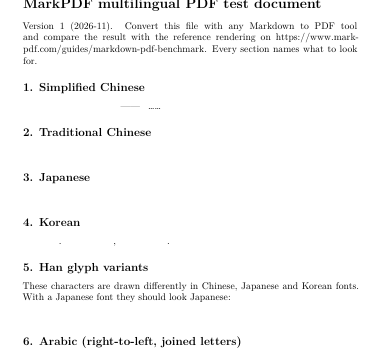
| Pandoc 3.5 + xelatex (XeTeX 4.16) | --pdf-engine=xelatex | PDF created, all CJK, Arabic, Indic, Thai, Tamil, Cyrillic and Greek text missing (blank) | Latin and Vietnamese only | 4 / 28 KB |
| Pandoc 3.5 + xelatex + CJK font | --pdf-engine=xelatex -V CJKmainfont="Microsoft YaHei" | Stops with a TeX error on the zero-width non-joiner in the Persian line. A CJK-only file works, but Korean is missing (the font has no Hangul) | – | – |
| Pandoc 3.5 + lualatex (LuaHBTeX 1.24) | --pdf-engine=lualatex | Same as xelatex: non-Latin text missing | Latin and Vietnamese only | 4 / 40 KB |
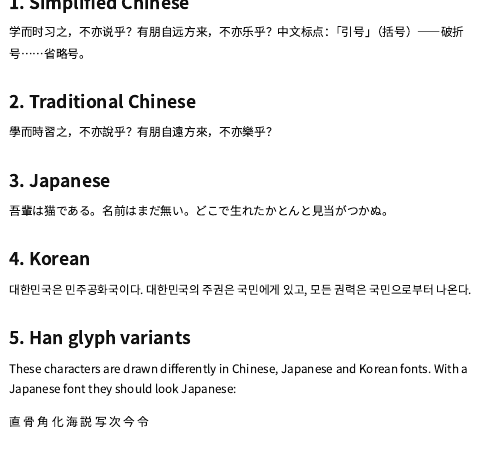
| md-to-pdf 5.2.5 (Chrome 157) | md-to-pdf test.md | All scripts render (Windows system fonts). Arabic paragraph laid out left-to-right; Han variants follow the lang attribute | All 14 probes | 4 / 203 KB |
| MarkPDF text (Chrome 157) | Converter → Download PDF (text) | All scripts render with Noto fonts; RTL paragraphs right-to-left; lang="ja" text in Japanese forms | All 14 probes | 5 / 511 KB |
| MarkPDF image (html2canvas 1.4.1) | Converter → Quick download (image) | All scripts render, identical to the preview | None (page images) | 6 / 1,883 KB |
Run the same test file in MarkPDF
Open the converterWhat the results mean
- LaTeX engines need explicit fonts per script. Without them, xelatex and lualatex do not fail; they drop the characters, so check every page. See Pandoc “Unicode character … not set up” and Arabic and Persian letters broken for working commands.
- Browser-based tools depend on installed fonts. md-to-pdf rendered everything here because Windows ships fonts for these scripts; on a minimal Linux server or Docker image the same command typically prints boxes until CJK and Indic fonts are installed.
- Page breaks: none of the tools that produced a PDF cut a line in half. MarkPDF’s image version moves whole blocks to the next page, which leaves more white space and one extra page.
- Limits of MarkPDF: the image version has no text layer; the text version uses the browser’s print dialog, so you choose “Save as PDF” yourself; there is no LaTeX-level typesetting (cross-references, bibliographies).
GUI tools (Typora, Obsidian, VS Code extensions) need manual testing and will be added with their versions once tested.
Frequently asked questions
Can I reproduce these results?
Yes. Download the test file, install the listed versions and run the commands in the table. Results depend on installed fonts, so note your OS and font set when comparing.
Why does md-to-pdf pass here but fail on my server?
It renders with Chromium, which uses the fonts installed on the machine. Install CJK and Indic fonts (for example the Noto packages) on the server or in the Docker image.
Why is MarkPDF’s text PDF larger?
It embeds subsets of several Noto fonts (one per script) so the PDF looks the same on every device.