Arabic or Persian letters come out separated or reversed in the PDF
Quick answer
Arabic script letters change shape depending on their neighbours and run right-to-left. If a PDF tool lays the text out left-to-right or draws letters one at a time, you get isolated letters in reverse order. In Pandoc, add -V dir=rtl -V lang=ar (or lang=fa for Persian) with an Arabic-capable font; in HTML-based tools set dir="rtl" and never apply letter-spacing to Arabic text.
Symptom, reproduced
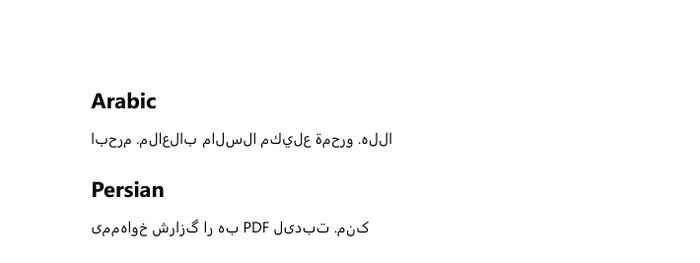
-V mainfont="Segoe UI" only: words come out in reverse order and the Persian line is scrambled.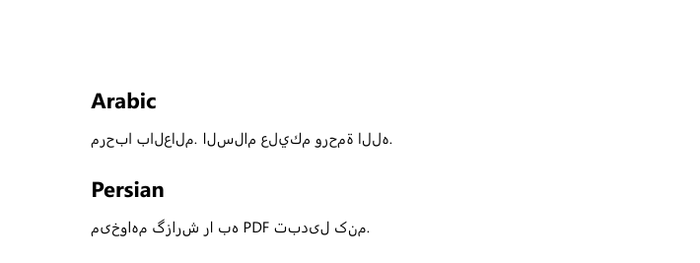
Cause
- Direction (bidi): without a right-to-left setting the line is laid out left-to-right, so words and letters appear reversed.
- Shaping: each Arabic letter has isolated, initial, medial and final forms. A renderer that does not shape the text (or one that draws glyph by glyph) shows isolated forms.
- letter-spacing with html2canvas: Chrome keeps Arabic joined even with letter-spacing, but html2canvas (used by many “HTML to PDF” buttons) then draws glyph by glyph and the letters fall apart (see below).
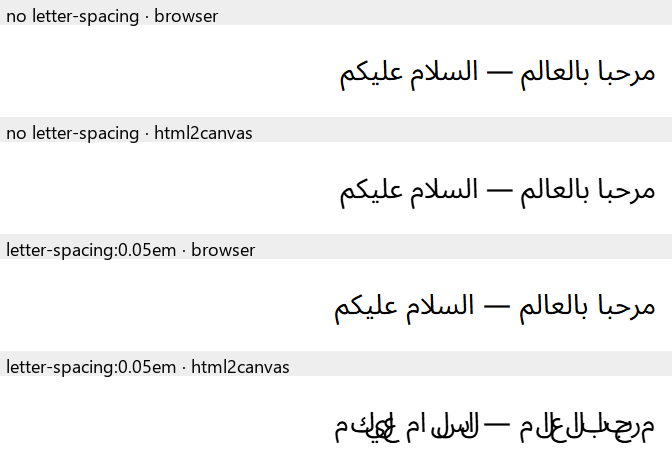
letter-spacing: 0.05em keeps the joins in Chrome but breaks them in html2canvas 1.4.1.Open an Arabic sample document
Open the Arabic sampleFix in Pandoc (tested)
pandoc input.md -o output.pdf \
  --pdf-engine=xelatex \
  -V mainfont="Segoe UI" \
  -V dir=rtl -V lang=ar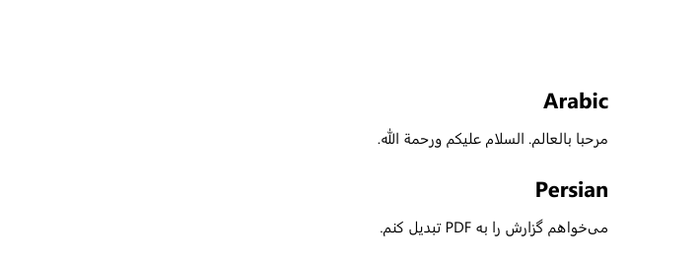
-V dir=rtl -V lang=ar: joined letters, right-to-left.Use lang=fa for Persian and lang=ur for Urdu. Any font with Arabic glyphs works; on Linux, Noto Sans Arabic or Noto Naskh Arabic.
Fix in HTML/Chromium tools
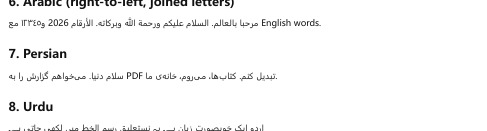
- Set the direction: wrap RTL paragraphs in
<div dir="rtl">…</div>, or use<p dir="auto">so each paragraph picks its own direction. - Remove
letter-spacingfrom body text in custom CSS. - Install an Arabic font on servers and in Docker images (e.g.
fonts-noto-coreon Debian/Ubuntu).
<div dir="rtl">

مرحبا بالعالم. هذا نص عربي.

</div>
In MarkPDF
Arabic, Persian and Urdu are detected automatically: the right Noto font loads, and each paragraph, list, quote and table takes its direction from its own text. Mixed English/Arabic documents work without markup.
Frequently asked questions
Why does the text look right in my editor but not in the PDF?
Editors and browsers shape and lay out Arabic automatically; many PDF pipelines need the direction and language set explicitly.
Do I need a special font?
Any font with Arabic glyphs and OpenType shaping tables. Noto Sans Arabic, Noto Naskh Arabic, Segoe UI and Tahoma all include them.
What about numbers and English inside Arabic text?
With the direction set to RTL, the bidi algorithm keeps numbers and Latin words in their own left-to-right order inside the line.