Bangla (Bengali) and Hindi Markdown to PDF: conjuncts split? Causes and fixes
Quick answer
MarkPDF renders Bangla with the Noto Sans Bengali font, and conjuncts (যুক্তাক্ষর) like ক্ষমা, বিজ্ঞান and সংস্কৃতি come out joined in the PDF, exactly as in the preview. Paste your Markdown, and the Bengali font loads automatically when Bangla text is detected. Then download the PDF.
Why Bangla often breaks in PDF converters
Bangla needs text shaping: consonant clusters must be replaced by conjunct glyphs, and vowel signs such as ি are drawn before the consonant they follow in memory. PDF tools that place characters one by one, or embed a font without Bengali glyphs, produce separated letters, misplaced vowel signs or empty boxes.
MarkPDF draws each word with the browser's own text engine, so the PDF matches what you see on screen. We checked ক্ষমা, বিজ্ঞান, সংস্কৃতি, শ্রী, স্বাস্থ্য and কৌশল against the browser rendering pixel by pixel.
Conjuncts split in Pandoc/LaTeX: reproduced and fixed (Bengali and Hindi)
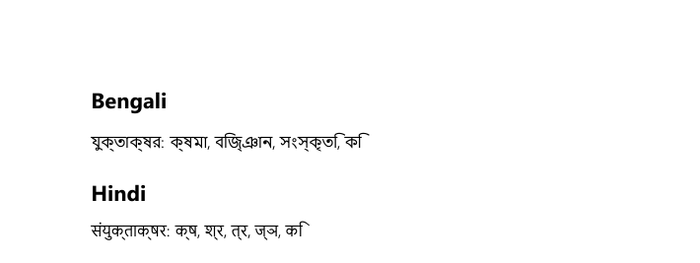
-V mainfont="Nirmala UI" only: ক্ষ, জ্ঞ, क्ष, ज्ञ are split into letter + virama, and the ি / ि vowel sign sits after the consonant. lualatex, even with Renderer=HarfBuzz, gave the same result.Cause: fontspec selects the Latin script by default, so the font’s Bengali/Devanagari shaping rules are never applied. Fix (tested): declare the script.
pandoc bn.md -o bn.pdf --pdf-engine=xelatex \
  -V mainfont="Noto Sans Bengali" \
  -V mainfontoptions="Script=Bengali"

# Hindi
pandoc hi.md -o hi.pdf --pdf-engine=xelatex \
  -V mainfont="Noto Sans Devanagari" \
  -V mainfontoptions="Script=Devanagari"
Script=Bengali the conjuncts form correctly (tested with Nirmala UI; Hindi with Script=Devanagari likewise).A document that mixes Bengali and Hindi needs one font family per script (a LaTeX font family with its own Script= option), or polyglossia/babel language settings.
Try it with a Bangla sample report
Open the Bangla sampleHow to convert
- Open the converter and paste your Bangla Markdown, or drop a
.mdfile. - Bangla text is detected automatically and Noto Sans Bengali is loaded. You can also choose it in ⚙ Settings.
- Check the preview and click Download PDF.
English and Bangla can be mixed in the same document, and Bengali digits (০১২৩৪৫৬৭৮৯) are supported.
Frequently asked questions
Is my document uploaded?
No. Everything runs in your browser; MarkPDF never receives your text.
Can I type Bangla directly in the editor?
Yes, with any Bangla keyboard layout or input tool (for example Avro or the built-in Windows/Android Bangla keyboards).
Can I select text in the exported PDF?
Yes, with Download PDF (text): it uses the browser’s print engine, so text stays selectable and conjuncts stay joined. Quick download (image) saves pages as images, where text is not selectable.
Is the interface available in Bangla?
Mostly. The home page, converter, FAQ, tutorial and syntax guide have a Bangla version (switch the language in the header); a few pages such as the privacy policy and terms stay in English.